
Website Design

Articles, News and Reviews

Web Hosting Solutions - Web Design

Shared Hosting vs VPS

Shared Hosting vs VPS Which One Should You Use? In the vast landscape of web hosting solutions, shared hosting and VPS (Virtual Private Server) are popular options catering to different needs and budgets. Choosing between them can significantly impact the performance, security, and scalability of your website or application. Understanding the differences between shared hosting and VPS is crucial for making an informed decision that aligns with your requirements. Here is a detailed comparison to help you determine which one is the right choice for you. Shared Hosting. Shared hosting is a type of web hosting where multiple websites are hosted on a single server. Resources such as CPU, RAM, and storage space are shared among these websites. It is an affordable option suitable for individuals, small businesses, and websites with moderate traffic. Shared Hosting Pros. Cost-Effective: Shared hosting plans are typically the most budget-friendly option available. Since resources are shared among multiple users, the cost per user is low. Ease of Use: Shared hosting providers usually offer user-friendly control panels, making it easy to manage your website, install applications, and configure settings without technical expertise. Maintenance: The hosting provider is responsible for server maintenance, security updates, and technical support, relieving users of these tasks. Shared Hosting Cons. Limited Resources: Resources such as CPU, RAM, and bandwidth are shared among multiple users. Heavy traffic or resource-intensive applications on other websites can impact the performance of your site. Less Control: Users have limited control over server settings and configurations since they are sharing resources with other websites. Security Concerns: Security vulnerabilities on other websites hosted on the same server can potentially affect your site’s security. There are many safeguards in place to prevent problems, but it’s worth bearing in mind. VPS (Virtual Private Server). A VPS is a virtual server environment created by partitioning a physical server into multiple virtual servers. Each VPS operates independently with its dedicated resources, including CPU, RAM, storage, and operating system. It offers greater control, flexibility, and scalability compared to shared hosting. VPS Pros. Dedicated Resources: Each VPS has dedicated resources, ensuring consistent performance even during traffic spikes or resource-intensive tasks. Customisation: Users have root access to their VPS, allowing them to customise server settings, install software, and configure security measures according to their specific requirements. Scalability: VPS hosting offers scalability, allowing users to easily upgrade or downgrade their resources as their website grows or changes. VPS Cons. Higher Cost: VPS hosting plans are typically more expensive than shared hosting due to the dedicated resources and increased flexibility they offer. Technical Expertise: Managing a VPS requires some level of technical knowledge, including server administration, software installation, and troubleshooting. Responsibility: Users are responsible for managing their VPS, including server maintenance, security updates, and backups. Which One Should You Use? The choice between shared hosting and VPS depends on various factors, including your budget, technical expertise, website requirements, and expected traffic. Use Shared Hosting If: You have a limited budget and are looking for an affordable hosting solution. Your website has low to moderate traffic and does not require dedicated resources. You prefer a hosting solution that is easy to set up and manage without technical expertise. Use VPS If: You require dedicated resources and consistent performance for your website or application. Your website experiences high traffic or resource-intensive tasks. You need full control over server settings, customisation options, and security measures. In conclusion, shared hosting and VPS serve different purposes and cater to various needs. Shared hosting is ideal for individuals and small businesses with budget constraints and moderate traffic, while VPS offers greater control, flexibility, and scalability for websites and applications with higher resource requirements. Assess your requirements carefully and choose the hosting solution that best suits your needs and budget. Share This Post   <lidata-term-id=”9″> Online Marketing <lidata-term-id=”11″> Web Design Redhill <lidata-term-id=”10″> Web Design Reigate <lidata-term-id=”7″> Web Development <lidata-term-id=”8″> Website Design

Read More »
NetService Hosting - Hosting & Domain Name Services

Website Hosting

NetService Hosting Hosting & Domain Name Services Why Choose NetService Hosting? NetService Hosting offers excellent-quality shared hosting and many cost-free bonuses, which will help you create your website very quickly. We have a proprietary hosting Control Panel called Hepsia and our tests have proven that it is at least 3 times quicker than other Control Panels. You can always rely on our 24/7/365 customer support team whose representatives will reply to you in no more than twenty minutes. NetService Hosting uses a custom hosting platform, which can provide regular users with benefits usually reserved for virtual or even dedicated servers. These include such items as native support for Memcached and Varnish, the ability to run and manage background processes, support for PgSQL databases, Git and SVN support, etc. It is built using the ZFS file system, which allows for strong file compression, effectively reducing the file size of all files hosted with us. ZFS also has native silent data corruption protection, something invaluable for hosting providers. Users are hosted on fast SSD drives, which allows for much-improved I/O rates when compared with regular hard drives. Thanks to the ZFS file system and the SSD drives, we don’t have a file quota or I/O limits for our users. ‘Mod_security’ is enabled by default, with an ever-expanding set of rules, designed to automatically protect your sites. You can also choose where to host your websites – we offer multiple data centers, located across the USA, Europe (UK), and Australia. Service Guarantees 24/7 Technical support. 1-hour response time guarantee. 99.9% Network Uptime. 99.9% Service Uptime. Anti-virus protection. Multiple daily data backups. NetService Hosting – The Advantages SSD STORAGE</h2 > SSDs (Solid State Drives) outperform HDDs (Hard Disk Drives) in just about every aspect. This is why all our servers are equipped with lightning-fast & ultra-reliable SSD drives, guaranteeing amazing performance for all your sites and apps. DATA COMPRESSION</h2 > All our servers use the ‘ZFS file system’, which makes writing and reading data fast and which will dramatically speed up your dynamic websites and demanding apps. DAILY DATA BACKUPS</h2 > We have developed a super-efficient data backup solution, which backs up all your files on a daily basis. You will be able to restore not only an older version of a given file, but also a full backup of your account. HARDENED SECURITY</h2 > We have worked hard to create a secure environment for your sites. The firewall, which is enabled by default, comprises a comprehensive set of security protection rules. TOP-OF-THE-LINE SERVER HARDWARE</h2 > A top-level hosting platform goes hand in hand with top-level hardware. We only use hardware components that have been thoroughly tested before being introduced into our production environment. Share This Post <lidata-term-id=”42″> Online Marketing <lidata-term-id=”39″> Web Design Redhill <lidata-term-id=”40″> Web Design Reigate <lidata-term-id=”37″> Web Development <lidata-term-id=”36″> Website Design

Read More »
Google Business Profile

Google Business Profile

Google Business Profile Web Design Why you need a Google Business Profile   A Google Business Profile (GBP) is a free business listing from Google. It allows you to provide details and photos of your business, including your location, website address, services and products. Creating this free profile is a great way to increase your visibility across Google services. Information from your GBP may appear in Google Search, Google Maps, and Google Shopping and is an integral part of search engine optimisation and web design. GBP is only available to businesses that have contact with customers. This includes businesses with a physical location (like a restaurant or store) and businesses that provide services by meeting with clients in other locations (like consultants or plumbers). What are the benefits? Get discovered in Google (and Google Maps). Whether you’re looking for foot traffic or web traffic, Google is the ultimate search referrer. A GBP helps ensure that people find your business when looking for products and services in their local area. Your GBP listing shows searchers where and how to visit your business. It also improves your local SEO. A listing for a local business is more likely to appear when people search for a nearby business using Google Maps. Control your online business information. Your GBP allows you to control and update your contact information, business hours, and other essential details as needed. Keep your details updated. You can post updates to share that you’ve expanded your services, temporarily closed, or fully reopened (an especially useful feature during emergencies like COVID-19). Your GBP adds to your local SEO and the information you share will probably rank above third-party sites that might have out-of-date details. Build trust through reviews. Reviews are a key element of social proof and a meaningful way to build trust and credibility for your brand, particularly within your local area. Google’s star rating and space for detailed reviews allow customers to share as much or as little information about their experience with your business as they like. All of this helps potential customers decide which businesses to visit and what products to buy. How to maximise your Profile. Complete all elements of your profile. Customers are 3 times more likely to consider your business reputable if you have a complete Google Business Profile. They’re also 70% more likely to visit your website. Google specifically states that “businesses with complete and accurate information are easier to match with the right searches”. This improves your score for relevance and helps you rank higher. The key here is to tell Google visitors “what you do, where you are, and when they can visit”. If your business hours change around holidays or seasons, make sure to keep them up to date. Verify your business and its location. Verified business locations are “more likely to show in local search results across Google products, like Maps and Search.” Including a verified location also helps improve your score for the distance ranking factor. Add real images and videos of your business. Your GBP includes a logo and cover photo. Use images consistent with those on your social profiles to make it easier for people to recognize your brand. But don’t stop there. Add images and videos to showcase your location, work environment, and team. If you run a restaurant, post pictures of your meals, menus, and dining room. Make sure they look appetising, and professional, and aren’t low-res. According to Google, businesses with photos receive more requests for directions and more clicks through to their websites. Share This Post <lidata-term-id=”42″> Online Marketing <lidata-term-id=”39″> Web Design Redhill <lidata-term-id=”40″> Web Design Reigate <lidata-term-id=”37″> Web Development <lidata-term-id=”36″> Website Design

Read More »
Redhill Web Design - SEO - PPC

On-Line Marketing Strategies

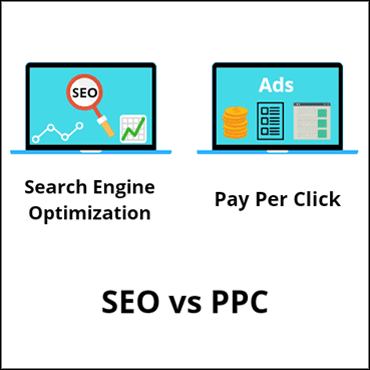
On-Line Marketing Strategies S.E.O or P.P.C – Which One Is Right for You? There are two major search engine marketing strategies in use today: SEO (search engine optimisation) and PPC (pay-per-click). Both strategies are entirely different, and it is tough to decide which one or which combination is right for you. To decide which strategy is best for you, consider the basics. It is easier to judge the pros and cons when taking the big picture into account. People will continue to battle for the top search engine positions. Search engine marketing is undoubtedly one of the best sources of targeted traffic. As people continuously try to find new and unique ways to get additional traffic to their websites, the SEO industry continues to grow. PPC refers to advertising on a search engine that charges on a per-click basis whenever a visitor clicks on one of your ads. The order of ads is usually based on bidding prices, meaning that the advertiser who bids the highest price per click will be listed first. These sponsored listings are known as PPC listings. SEO tries to change your search engine ranking by looking at several factors including link popularity, Page Rank and so on. If your website is search engine optimised, then obviously you are more likely to have a good ranking in the search engines. A well-optimised and marketed site will be listed in the top results whenever a person searches for related keywords. One of the best benefits of SEO marketing is you don’t have to pay for any clicks! So, how can we decide which method is better? Both methods serve different purposes. However, one is likely to be a better fit for your business than the other one. Pay Per Click PPC traffic, rankings and results tend to be more stable and predictable than SEO, and, combined with its low cost, this makes PPC one of the more popular ways of advertising. Most companies try PPC before they try SEO because it’s seen as more stable. In many cases PPC lets you rank well on the search engines, without having to do the tedious work involved in SEO – no finding link partners, posting links, creating content and so on. If you have the budget for it, the ranking is yours. Another advantage is that the listing will get posted when you want it and not when the search engine gets around to it. With PPC’s popularity growing day by day, the market is also getting competitive. You will find that CPCs (costs per click) are steadily rising, and for a common man, it is getting tough to invest much. As with most auctions, the more people bidding on PPC, the higher the prices get. S.E.O The main benefit of SEO is that it does not cost per click. The disadvantages are that the traffic to your website is more unpredictable and requires a lot of work. With SEO, you must adapt and constantly change strategies as search engines change their algorithms. SEO is also slower than PPC, as many search engines don’t list new sites. So, what should you choose? Well, it depends on how much money you are willing to spend, what your timeline is, and what your return on investment is. If you have cash then PPC should be your first choice, as it produces fast results. PPC can also be used for testing the effectiveness of websites. If you have time and money to invest in long-term results, SEO is an excellent option as well. All and all, the best marketing strategy is typically to go with PPC in the short term to get immediate traffic and analyse conversions. SEO should then be taken with a long-term view in mind, so you can reap the benefits of free traffic later. Whichever strategy you choose NetService Web Design can produce a marketing plan best suited to your needs, both short-term and in to the future. Share This Post <lidata-term-id=”42″> Online Marketing <lidata-term-id=”39″> Web Design Redhill <lidata-term-id=”40″> Web Design Reigate <lidata-term-id=”37″> Web Development <lidata-term-id=”36″> Website Design

Read More »
Website Design Cost

Website Design Cost

How much do you charge for a website? The Unpredictable Nature of Web Design Why Providing a Fixed Price for a New Website is Challenging Introduction. In today’s digital age, websites are the lifeline of businesses and individuals alike. A well-designed website can create an impactful online presence, attract customers, and boost revenue. However, the process of designing a website is complex and ever-changing, making it impossible to provide a fixed price for a new website design. Unique Project Requirements. Each website project is different, with its own set of requirements, objectives, and complexities. The scope of the project plays a crucial role in determining the price. A simple, single-page website will cost significantly less than a complex e-commerce platform with extensive features. Clients may have specific design preferences, requirements, and integration needs that contribute to the overall project. Continual Design Process. Web Design involves constant feedback and revisions. As the project progresses, clients might request changes or add new features, affecting the project’s timeline and cost. This continuous back-and-forth again makes it impossible to provide a fixed price, as the final scope of work may not be determined until the later stages of the project. Unclear Project Briefs. In some cases, clients may not have a clear vision of what they want for their website or lack technical expertise. As a result, web developers may struggle to accurately estimate the time and effort required to bring the client’s vision to life. Without a detailed project brief, providing a fixed quotation becomes even more challenging, as the workload might change significantly during the design process. Technological Advancements. Web design technologies and frameworks evolve rapidly. New tools, plugins, and libraries may emerge during the development period, providing additional functionalities that clients never knew were available and might want to integrate into their websites. Incorporating these advancements can lead to extra time and work and, consequently, increase the overall cost. See the Latest WordPress News. External Dependencies. Website design projects often rely on various external factors that are beyond the developer’s control. For instance, delays in content creation, third-party API integrations, or client approvals can affect the project’s timeline and, in turn, the cost. You will also need to take into account the hosting requirements of the website. Take a look at NetService Hosting. Unforeseen Challenges. Despite meticulous planning, unforeseen challenges can arise during the development process. Compatibility issues, security concerns, or unexpected technical difficulties may require additional work, leading to cost fluctuations. Conclusion. The intricacies and uniqueness of each website design project make it completely impossible for web developers to offer a fixed price. You should seriously question any company or designer that does offer a fixed price without knowing all the details. As clients and developers collaborate closely, maintaining transparent communication and setting realistic expectations become crucial. By understanding the complexities involved and embracing the whole of the design process, clients can have a website that aligns with their vision and goals while developers can deliver a successful project without compromising on quality. Share This Post <lidata-term-id=”42″> Online Marketing <lidata-term-id=”39″> Web Design Redhill <lidata-term-id=”40″> Web Design Reigate <lidata-term-id=”37″> Web Development <lidata-term-id=”36″> Website Design

Read More »
Web Design for Redhill Carpenter

New Web Design

New Web Design Locally Based Carpenter George Wilson Carpentry NetService has designed a new website for a local carpenter. The customer wanted an online presence to increase business and to showcase his portfolio. Once the site was built, it was optimised for page loading speed (see our post about page speed). There are a lot of pictures on the site, and all of these had to be sized correctly and the file size correctly balanced between speed and quality. There is no point uploading a huge high-resolution image when you are only displaying it on a small section of your site. It was then time to sort out the search engine optimisation (S.E.O). The domain name was added to ‘Google Search Console’ and a new Google Business Profile was created. After just 2 days the site shows on page 3 of Google for its main search keywords. More work needs to be done but this is where NetService is different. We don’t just build the site, we stay with you to continually develop your website and bring in the optimal revenue from it. To see the website, go to the George Wilson Carpentry website. click the link and it will open in a new tab Share This Post <lidata-term-id=”42″> Online Marketing <lidata-term-id=”39″> Web Design Redhill <lidata-term-id=”40″> Web Design Reigate <lidata-term-id=”37″> Web Development <lidata-term-id=”36″> Website Design

Read More »
Web Design Redhill - WordPress

Why WordPress?

Web Design News Why WordPress? Why Do We Use WordPress? WordPress started in 2003 predominantly as a blogging platform and, according to a recent survey, now powers 43% of all websites on the internet. Due to its robust features, many of the top brands use WordPress to power their websites including Time Magazine, Facebook, The New Yorker, Sony, Disney, The New York Times, and more. WordPress is no longer just a blogging platform. It has evolved throughout the years into a versatile content management system (CMS). While you can still use WordPress to create a simple blog, it also allows you to create fully functional websites and mobile applications. WordPress is very flexible with the addition of themes and plugins. You can do a simple basic website or power a giant e-commerce store. It can do pretty much anything you need. Themes are basically web design templates giving you the opportunity to choose from a huge selection of styles to either use on your site or to get ideas from what others have already done. Plugins are software add-ons that allow you to expand the functionality of WordPress. You can get anything from a simple spell checker up to a full e-commerce plugin allowing you to sell thousands of products all around the globe. NetService and WordPress. The reason we use WordPress is that every customer and every web design needs something different, and this is where WordPress excels. That, and the management tools available to us and our clients make this our platform of choice. WordPress gives our customers the ability to work directly with us and have the option to take over the management of their own website. We have years of experience teaching WordPress, and our customers love the fact that they can see how and why we do specific things on their websites. The Evolution of WordPress. Introduction. WordPress, the ubiquitous content management system (CMS), has become a household name on the internet, powering millions of websites across the globe. Its journey from a simple blogging platform to a versatile CMS is a testament to its adaptability and the vibrant community that surrounds it. This is a quick look through the history of WordPress, exploring its origins, key milestones, and the impact it has had on web design and development. Genesis of WordPress. The story of WordPress begins in 2003 when Matt Mullenweg and Mike Little forked the code of an existing blogging platform called ‘b2/cafelog’. The aim was to create a more user-friendly and customisable platform for bloggers. The result was the birth of WordPress. WordPress 1.0 – Blogging Takes Centre Stage. WordPress 1.0 was released in January 2004, marking the official launch of the platform. It featured a user-friendly interface, a template system, and a commenting system, making it an instant hit among bloggers. The open-source nature of WordPress allowed developers to contribute and enhance its functionality. The Rise of Themes and Plugins. The introduction of themes and plugins opened a world of possibilities for users to customise the look and functionality of their websites. This led to a thriving ecosystem of developers creating a vast array of new themes and plugins, further enhancing WordPress’s position as a versatile platform. WordPress 2.0 – A New Era. Released in 2005, WordPress 2.0 brought significant improvements, including a revamped admin interface and the introduction of the plugin architecture. This version set the stage for WordPress to evolve beyond a blogging platform into a full-fledged content management system. The Birth of WordPress.org. In 2005, WordPress.org was established as the official home of the WordPress community. This platform served as a hub for documentation, forums, and the download repository. The community-driven approach played a pivotal role in shaping the future of WordPress. WordPress 3.0 – Multisite and Custom Post Types. The release of WordPress 3.0 in 2010 marked another milestone. It introduced the Multisite feature, allowing users to manage multiple sites from a single installation. Custom post types were also introduced, enabling more flexibility in content creation and management. Gutenberg and the Block Editor. In 2018, WordPress underwent a significant transformation with the release of version 5.0, featuring the Gutenberg block editor. This revolutionary editor replaced the traditional editor with a block-based system, providing a more intuitive and flexible content creation experience. WordPress Today. As of the last knowledge update in January 2022, WordPress continues to be a dominant force on the web. Its vast community, constant updates, and commitment to open source principles ensure that it stays at the forefront of web development. WordPress powers a diverse range of websites, from blogs and small business sites to large-scale enterprise solutions. Conclusion. The history of WordPress is a tale of evolution, innovation, and community collaboration. From its humble beginnings as a blogging platform to its current status as a versatile CMS, WordPress has come a long way. As we look to the future, it’s clear that WordPress will continue to play a vital role in shaping the landscape of the internet, empowering users to create and manage content with ease. Share This Post <lidata-term-id=”42″> Online Marketing <lidata-term-id=”39″> Web Design Redhill <lidata-term-id=”40″> Web Design Reigate <lidata-term-id=”37″> Web Development <lidata-term-id=”36″> Website Design

Read More »